Copy Codes Exactly
Codes can be case-sensitive and may include punctuation, so copying is safer than typing.
Last checked: May 3, 2026
Use these working Anime Apocalypse Roblox codes for rewards such as coins, spins, gadgets, tickets, rerolls, and drop boosts. Copy each code exactly, including punctuation.
| Code | Rewards | Status | Copy |
|---|---|---|---|
SORRYFORBUGS | 50,000 Coins, 55 Raid Tickets, 30 Trait Rerolls, 2 Normal Ability Spins, 2 Normal Gadget Spins, 15 Lucky Ability Spins, 10 Lucky Gadget Spins, and x2 Drops for 1,500 minutes | NEW | |
IAMATOMIC | 20,000 Coins, 15 Raid Tickets, 6 Trait Rerolls, 3 Normal Ability Spins, 3 Normal Gadget Spins, 3 Lucky Ability Spins, 3 Lucky Gadget Spins, x2 Drops for 1,200 minutes, and x2 Coins for 1,200 minutes | NEW | |
HEADOFHEI | 12,000 Coins, 10 Raid Tickets, 4 Trait Rerolls, 3 Normal Ability Spins, 3 Normal Gadget Spins, 3 Lucky Ability Spins, 2 Lucky Gadget Spins, and x2 Coins for 900 minutes | NEW | |
SHADOWGARDEN | 18,000 Coins, 15 Raid Tickets, 5 Trait Rerolls, 2 Normal Ability Spins, 2 Normal Gadget Spins, 4 Lucky Ability Spins, 4 Lucky Gadget Spins, and x2 Drops for 1,500 minutes | NEW |
These codes are no longer confirmed as working in the latest check.
| Code | Note |
|---|---|
THANKSFOR5K | Expired in the May 3, 2026 code update. |
RELEASE! | Expired in the May 3, 2026 code update. |
THXFORPLAYING | Expired in the May 3, 2026 code update. |
SORRYFORDELAY | Expired in the May 3, 2026 code update. |
THANKSFOR7KPLAYERS | Expired in the May 3, 2026 code update. |
ROBLOX01S | No longer listed as working in the May 3, 2026 code update; verify before using. |
Codes can be case-sensitive and may include punctuation, so copying is safer than typing.
Older public servers may not recognize newer codes immediately.
New codes often appear around milestones, patches, delays, and release events.
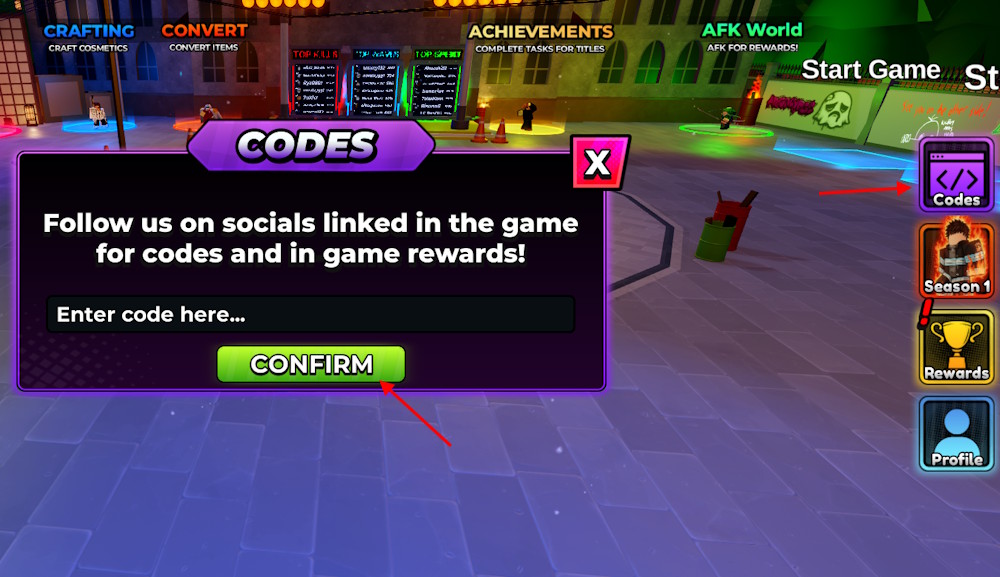
Launch the Roblox game, select Codes from the right-side menu, enter a working code exactly, and press Confirm.
The code may be expired, misspelled, already redeemed, or unavailable on an older server. Copy the code exactly and try a fresh or private server.
New codes usually come from official game updates, community milestones, Discord announcements, Roblox group posts, and developer updates.